What is Transmission Remote GUI?
Transmission Remote GUI is a free, open-source (MIT) native macOS app that remotely controls a Transmission BitTorrent daemon running on your NAS, seedbox, Raspberry Pi, or home server. It talks to Transmission over its RPC API — so your Mac stays a clean remote control, while the actual downloading and seeding happen on your always-on box. It is a modern macOS torrent client front-end and a drop-in transgui alternative, rebuilt in SwiftUI, adding per-tracker torrent rules, sequential streaming, RSS auto-download, labels, live speed graphs, a scheduler, and optional mTLS.
Requires: a running Transmission daemon (transmission-daemon) with RPC enabled, and macOS 14 (Sonoma) or later — Apple Silicon or Intel. It does not run the BitTorrent engine itself; that lives on your server.
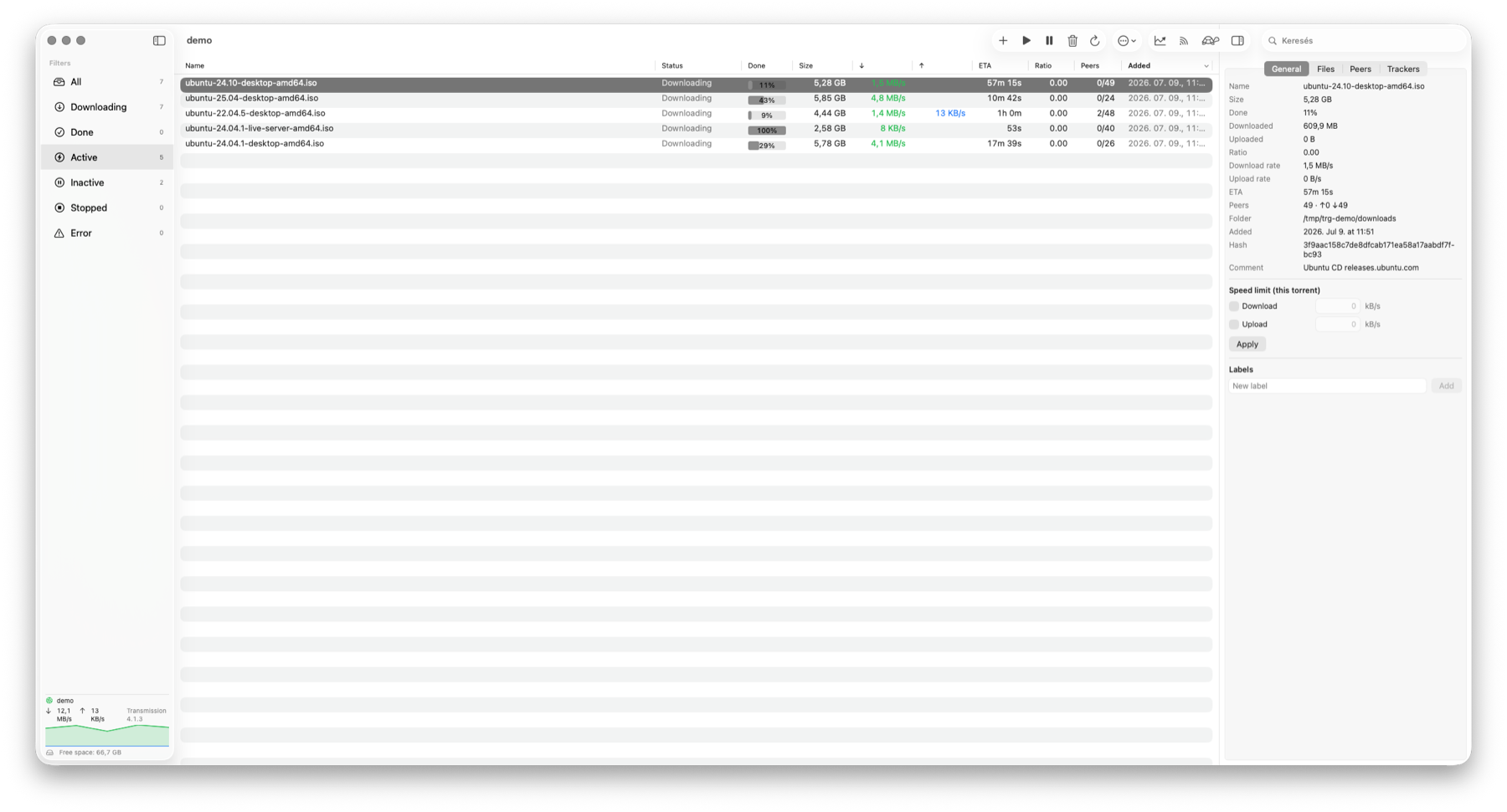
Features
🎯 Torrent rules
Per-tracker, label or name rules set seed ratio, idle limit, speed limits and labels — or stop. First match wins, a dry run shows every change first, and the daemon keeps enforcing limits while the app is closed.
📂 Open With & magnet links
Double-click a .torrent in Finder or click a magnet link in the browser — it lands on your server, even if the app was closed.
▶ Sequential streaming download
Transmission 4.1+ — pieces download in order, so you can watch media while it still downloads. No official GUI exposes this.
📡 RSS auto-download
Watched feeds + title-match rules (text or /regex/) → automatic torrent add, with dedup.
🏷 Labels & filters
Tag torrents into categories and filter the list by label from the sidebar.
📈 Live speed graphs
A sidebar mini-chart, a full Statistics panel, and a Stats-app-style menu-bar popover.
⏱ Bandwidth scheduler
Turbo limits on/off by time of day and day of week, plus one-click turtle mode.
🔒 mTLS client certificate
Optional client-certificate authentication per server, for a reverse proxy that requires it.
🚀 Fast & native
NSTableView-backed list handles tens of thousands of torrents; menu-bar icon, hideable Dock icon.
🌐 Multilingual
English, Hungarian and Simplified Chinese, switchable at runtime. Multiple servers, Keychain passwords, auto-connect.
All features
- Torrent list with columns (name, status, progress, size, ↓/↑ rate, ETA, ratio, peers, added, last activity) and fast native sorting
- Customizable columns: right-click the list header to show/hide columns — extra ones: completed on, remaining, downloaded, uploaded, download folder, seeds / leechers (connected, and the swarm size the trackers report — e.g.
3 (120)), tracker, labels; order, widths and visibility are remembered, *Default Columns* resets them - Sidebar filters with counts (All / Downloading / Done / Active / Inactive / Stopped / Error), plus tracker, download folder and label (category) filters with counts — they combine with each other and the status filter; each section's All … row (or clicking the selected row again) clears just that filter. The list scrolls above a separate status footer, so long tracker lists cannot overlap the connection status or speed graph.
- Search within the list
- Download queue reordering: right-click selected torrents → *Move to Top / Move Up / Move Down / Move to Bottom*. The optional Queue Position column (hidden by default) shows 1-based positions and sorts numerically; sorting the table alone never changes the daemon's queue.
- Add torrents via magnet link / URL, **
.torrentfile, or drag & drop** onto the window - Choose the download folder in the Add dialog — a daemon-side path for that torrent only (defaults to the daemon's download folder, which stays unchanged), with per-server favorite and recently used folders
- Open With / double-click a
.torrentin Finder, click a magnet link, or drop a torrent onto the window — asks where to save before adding to the current server (queued until connected if the app was closed). The Add dialog offers the remote folders from your server's path mappings, and Cancel submits nothing. Choosing a.torrentfile in the dialog also waits for Add. - Start / stop / remove (optionally along with data), verify, and reannounce — from the toolbar or the row's right-click context menu
- Right-click context menu on torrent rows, which also offers move (
torrent-set-location, with an optional "move the files" switch), rename (torrent-rename-path), and copy name / hash. A click inside a multi-selection acts on the whole selection, like Finder. - Batch-edit properties of the selected torrents (right-click → *Properties…*): download / upload limit, honour global speed limits, bandwidth priority, peer limit and labels. Fields where the torrents differ show as *Mixed*; nothing changes unless you edit it. Labels can be added / removed (every other label stays) or replaced as a whole list (labels need Transmission 3.00+)
- Details panel (toggled with ⌘I) with tabs: General / Files / Peers / Trackers
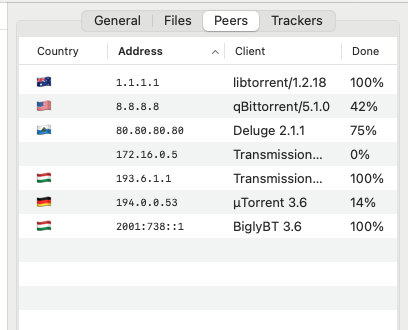
- Peers with country flags (bundled, offline country data — see Peers); every Peers / Trackers column is sortable, addresses in numeric order
- Files as a folder tree: expand/collapse folders with aggregated size and progress; a folder's checkbox (mixed when partly selected) and priority apply to every file inside in one call; Show in Finder for a single file or folder when a path mapping applies
- Per-torrent speed limit; labels/categories editing
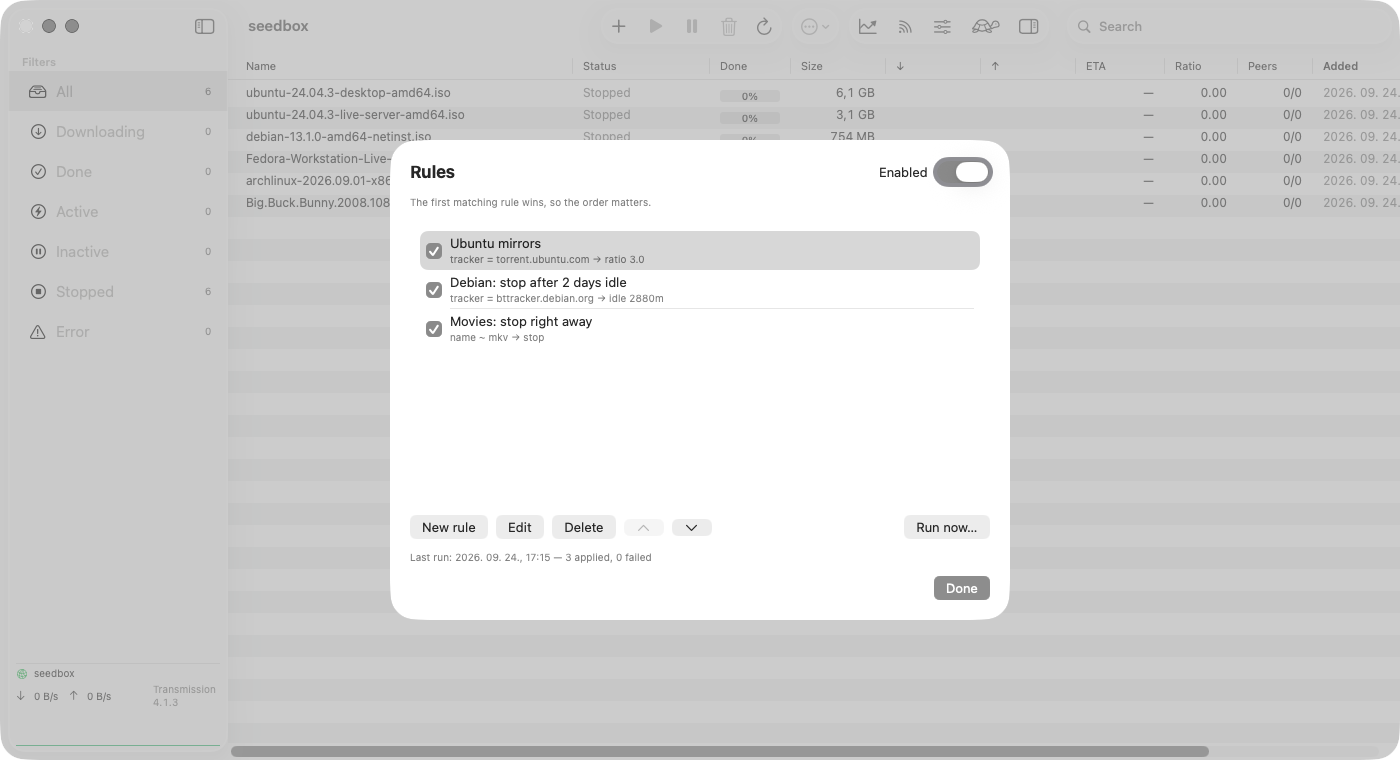
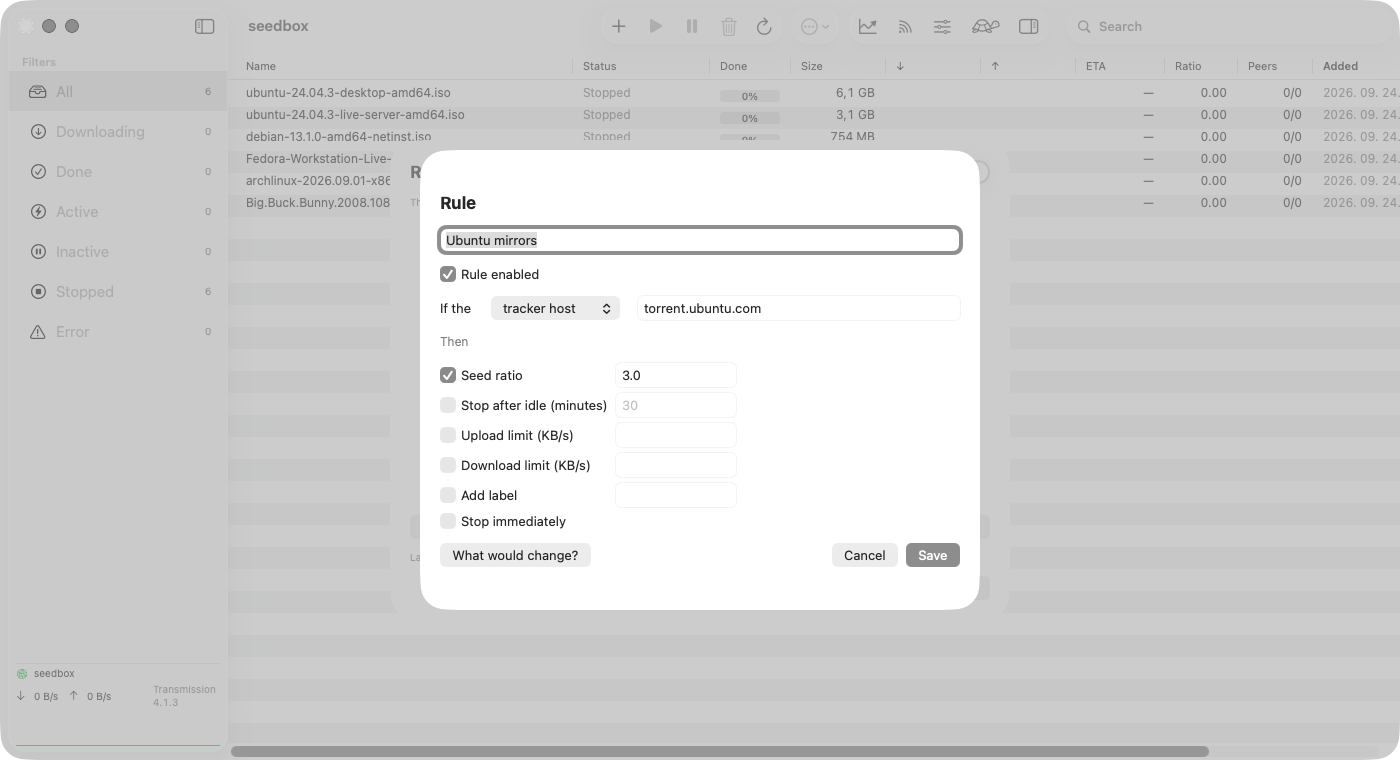
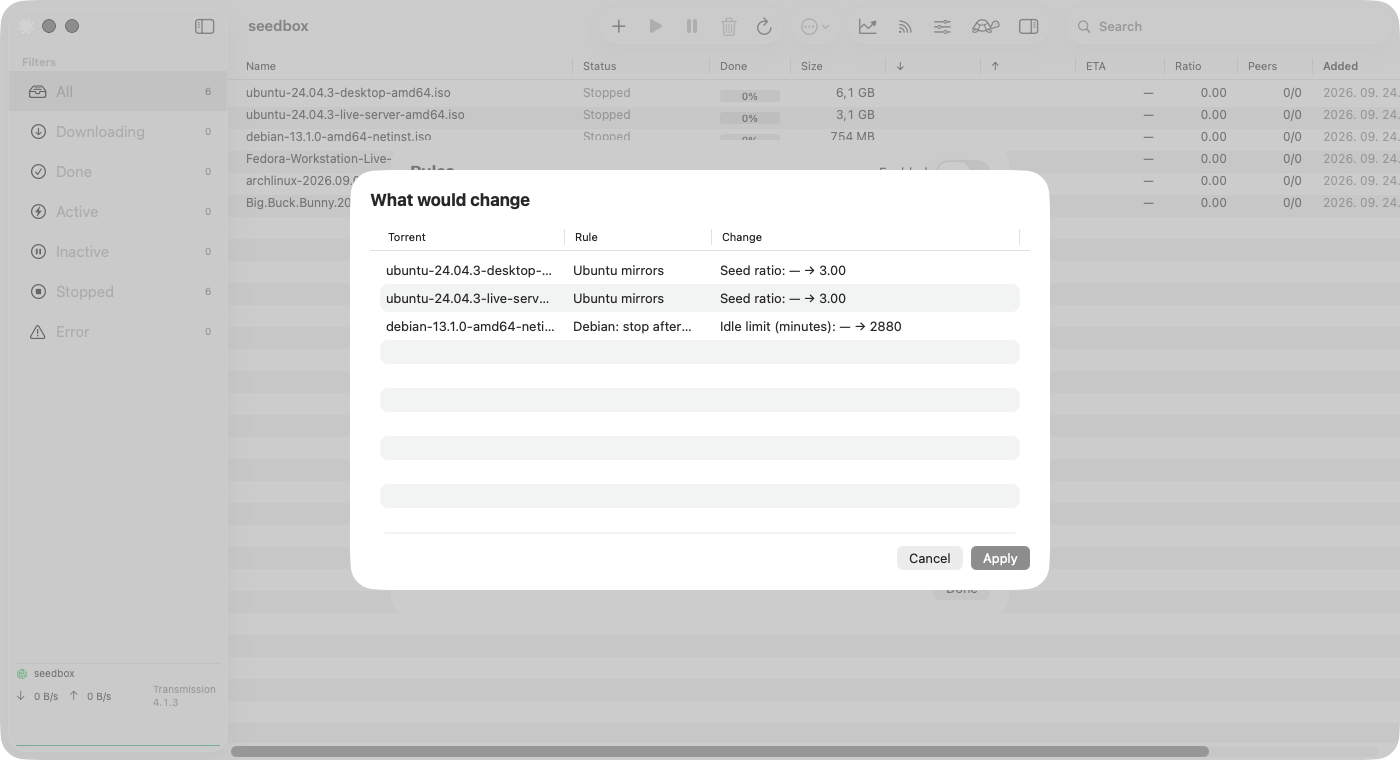
- Torrent rules — per-tracker, per-label or per-name rules that set seed ratio, idle limit, speed limits and labels, or stop the torrent. First match wins, each torrent is classified once (manual changes are never overwritten), and every change is shown in a dry run first. Ratio/idle limits are enforced by the daemon, so they keep working while the app is closed. Screenshots ↓
- RSS auto-downloader — watched feeds + title-match rules (substring or
/regex/) → automatic torrent add, with dedup - mTLS client-certificate authentication (optional
.p12per server) for a reverse proxy that requires it - Speed graph — a live mini-chart in the sidebar, a detailed Statistics panel, and a Stats-style menu-bar popover
- Sequential ("streaming") download (Transmission 4.1+) — pieces download in order so media can be watched while still downloading; no official GUI/Web UI exposes this yet
- Multiple servers, managed in Settings; passwords stored in the Keychain; auto-connect to the last used server on launch
- Show in Finder via per-server remote-to-local path mappings for mounted shares (the menu item appears once a server has a mapping)
- Full session settings (speed, peers, network, queues, download, seeding) — written immediately via
session-set - Turtle mode (alternative speed limits) with one click, plus a bandwidth scheduler (turbo on/off by time of day and day of week)
- Notification when a torrent finishes downloading
- Menu bar (tray) icon with ↓/↑ speeds and a live graph; the Dock icon can be hidden (app lives in the menu bar only)
- UI zoom (⌘+ / ⌘− / ⌘0), vertically centered torrent-list text at every zoom level, automatic refresh with configurable interval
- Multilingual UI: English, Hungarian and Simplified Chinese, switchable at runtime (Settings → General); separate, reusable language packs
- Update check: once a day (and from the app menu: *Check for Updates…*) — a new release shows as a small link in the sidebar (no pop-ups), with the
brew upgradecommand for Homebrew installs; *Skip This Version* is remembered - Opt-in, anonymous usage statistics — off unless you switch it on in Settings → General; see Privacy
Torrent rules
Set it once per tracker: seed Ubuntu mirrors to ratio 3, stop Debian after two idle days, stop movies right away. Every new torrent is classified once — a manual change is never overwritten — and nothing is applied before you have seen it in the dry run.
Peers
A country flag for every peer, looked up offline in a table that ships with the app — no peer address leaves your Mac. Every column sorts, addresses numerically. Country data: IP Geolocation by DB-IP (CC BY 4.0).
Why Transmission Remote GUI vs. transgui or the web UI
| This app | transgui | Transmission Web UI | |
|---|---|---|---|
| Native macOS (SwiftUI, Retina, dark mode) | Yes | No (Lazarus/GTK) | Browser only |
| Sequential streaming download | Yes | No | No |
| Per-tracker seeding / speed rules with dry run | Yes | No | No |
| RSS auto-download (regex rules) | Yes | Yes | No |
| Menu-bar popover + Keychain passwords | Yes | No | No |
| Live speed graphs | Yes | Partial | No |
| mTLS / client-cert auth | Yes | No | Depends on proxy |
| License | MIT (free) | GPL (free) | Free |
Install
brew install --cask epaxpax/tap/transmission-remote-gui-macosOr download the latest .dmg. Ad-hoc signed (not notarized): the cask installs without a Gatekeeper prompt; for the .dmg, first launch = right-click → Open.
Set up in 3 steps
1. On your server, enable RPC in Transmission (rpc-enabled, set a username/password). 2. Install this app on your Mac. 3. In the app: Settings → Servers → + → enter the host, port (9091), and credentials → Connect.
FAQ
Is Transmission Remote GUI free?
Yes — completely free and open source under the MIT license. No paid tier, subscription, in-app purchase, or ads.
Do I need a server to use it?
Yes. It is a remote for an existing Transmission daemon (on a NAS, seedbox, Raspberry Pi, or any machine running transmission-daemon with RPC enabled). It does not download torrents on its own — that is by design.
Is it a good transgui alternative for macOS?
It is a native SwiftUI rewrite for Mac. It speaks the same Transmission RPC API as transgui but adds macOS-native features — a menu-bar popover, Keychain passwords, and sequential streaming — that the classic transgui lacks.
Is it safe? Is the app signed?
It is open source (MIT), so every line is auditable. The Homebrew cask installs it without a Gatekeeper prompt; the .dmg is ad-hoc signed (not notarized), so on first launch right-click the app and choose Open.
Does it collect any data?
No personal data. The app talks to your own Transmission server; besides that it only asks GitHub once a day for the latest version number (can be switched off). Anonymous usage statistics — app, macOS and daemon version only — are opt-in and off by default. This website uses GoatCounter — privacy-friendly analytics, no cookies.
What macOS version do I need?
macOS 14 (Sonoma) or later, on both Apple Silicon and Intel Macs. Sequential streaming additionally needs a Transmission 4.1+ daemon.